

Choose electronics by the job: sonar, shore waypoints or USB backup. Check exact packages, mounting, power, Canadian charts and offline access.
- Match Fishing Electronics and Gadgets for Canadian Waters to your water, season, boat size, and actual skill level instead of buying by specs alone
- Prioritize readable controls, durable construction, and Canada-relevant use cases before chasing premium features
- Use the guide to compare what matters in the field: setup time, reliability, safety, storage, and upgrade path
Bottom line The right Fishing Electronics and Gadgets for Canadian Waters choice solves your real Canadian trip conditions without adding gear you will not use
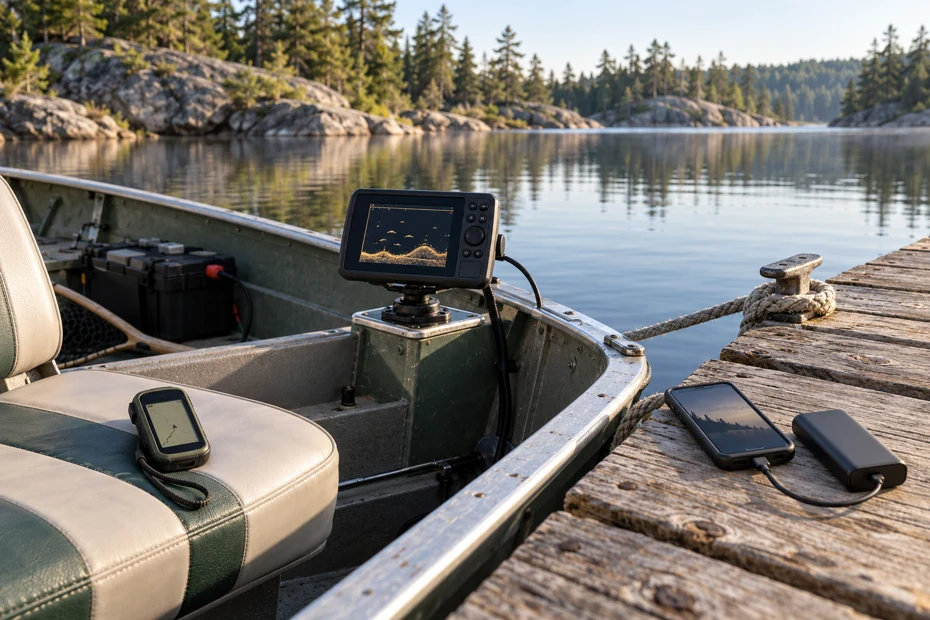
Fishing electronics and gadgets are useful when they answer a specific question: what is below the boat, where did you record a location, or how will your phone stay powered? For a Canadian lake, coastal trip or walk to a remote bank, choose that job before choosing a screen.
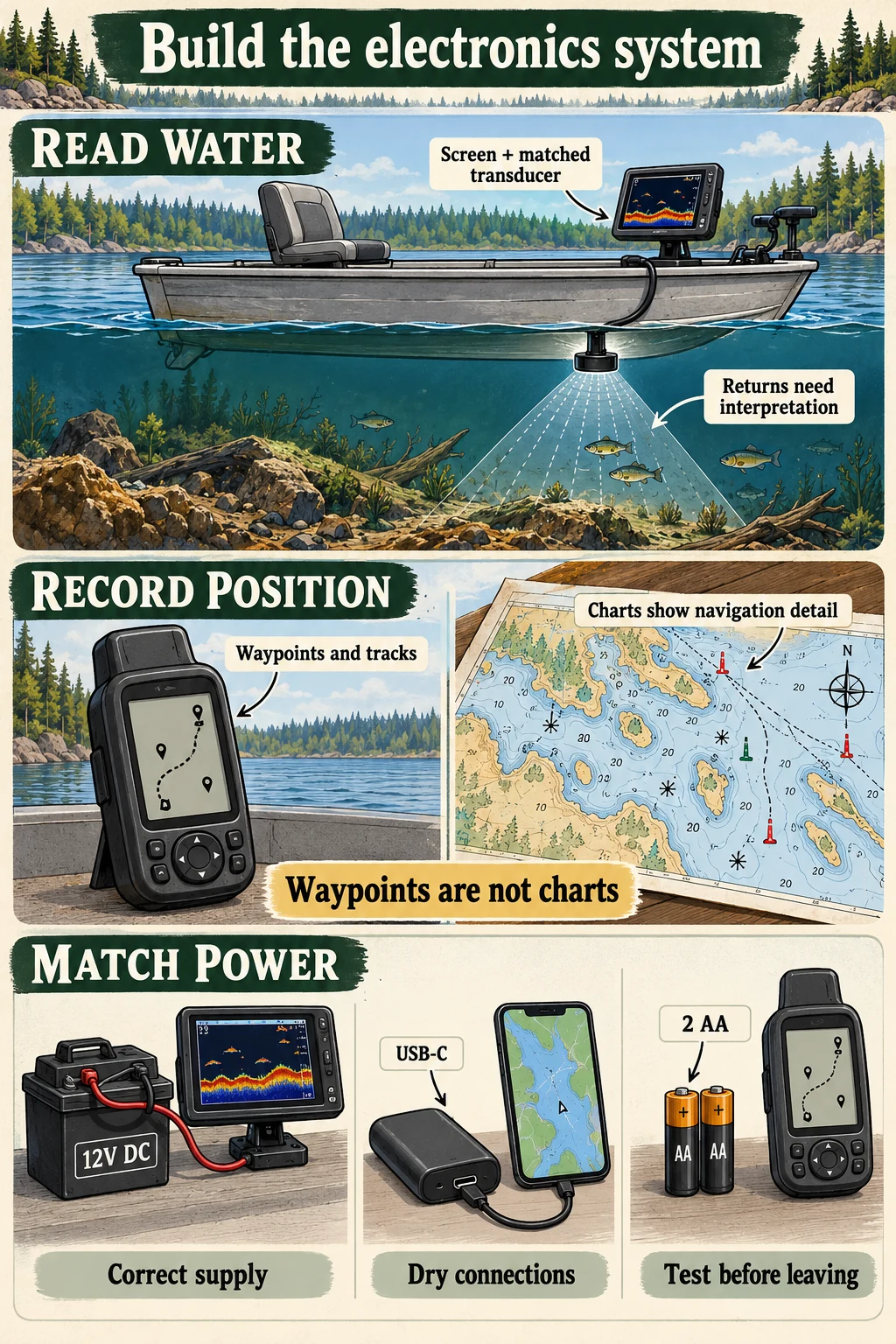
A sonar display needs a compatible transducer, mounting and power. A handheld hiking GPS can record a shoreline approach, but it is not a marine chartplotter. A USB power bank can support a compatible phone without becoming a battery for a wired fishfinder.
As an Amazon Associate, CanadaFever earns from qualifying purchases. Product links lead to Amazon.com. Confirm the exact model, package contents, Canadian delivery, currency, shipping and any import charges before paying.
Choose fishing electronics and gadgets by the job
These are specification-based selections for three distinct tasks. CanadaFever checked the model identities and manufacturer documentation. We have not field-tested their sonar returns, position accuracy, water resistance or battery runtime.
| Exact option | Useful job | Limit to understand |
|---|---|---|
| Garmin STRIKER 4 010-01550-00 | Traditional CHIRP sonar with the included dual-beam transducer; GPS fishing waypoints. | 3.5-inch display; external DC power; no detailed navigational chart package. |
| Garmin eTrex SE 010-02734-00 | Handheld recording and point-to-point navigation for a shore approach. | Cities-only basemap; two AA batteries; not a marine chartplotter or satellite messenger. |
| Nitecore NB10000 Gen4 | USB-C backup for a compatible phone or other suitable USB device. | 39Wh nominal energy; 22.5W maximum individual output, 15W shared total. No direct fishfinder connection. |
Check what is missing from the existing setup. If the sonar already shows the detail you need, compare a secure mount or suitable power system before buying another display. Check compatibility before replacing a working component.
For a deeper comparison of screen sizes and sonar systems, use our fish finder and fishing electronics buying guide. The focus here is putting a usable system together.
Three options for different parts of the kit
Garmin STRIKER 4: basic sonar with fishing waypoints
The original STRIKER 4, part 010-01550-00, combines a 3.5-inch colour display with traditional CHIRP sonar and GPS waypoint functions. Garmin’s matching package includes a dual-beam transducer, transom and trolling-motor mounting hardware, tilt/swivel display mount and power cable.
Compare it when a small mounted display can cover the fishing task and you have a suitable installation plan. Its screen can show bottom returns and potential fish targets, but interpreting those returns takes practice. A mark is not a verified species identification or proof that a fish will bite.
This older basic model is distinct from STRIKER Plus, Vivid and cv versions. It does not provide ClearVü or SideVü scanning. GPS here provides fishing-position tools rather than detailed nautical charts; do not buy it expecting a chart card to turn it into a full chartplotter.
The selected package is the standard transducer version, not a complete portable battery-and-bag or ice bundle. Budget for a compatible DC supply and any extra mounting you need. Garmin specifies a 10–20V DC input range; follow its installation instructions for the cable, polarity and fuse protection.

Garmin STRIKER 4 010-01550-00
- 3.5-inch traditional CHIRP fishfinder with GPS fishing waypoints.
- Selected package includes the dual-beam transducer, mounts and power cable.
- Requires suitable external DC power; no detailed marine charts or complete portable battery kit.
Garmin eTrex SE: record a shore approach separately
The eTrex SE, part 010-02734-00, is a button-operated hiking GPS with a monochrome screen, saved waypoints and track functions. Garmin specifies two replaceable AA batteries, not included. Its built-in basemap shows cities only.
It fits a shore-access kit when you want a separate device for recording the approach or navigating between saved positions. Practise saving, naming and retrieving a point before a trip. Check the track-recording settings, because a unit sitting in the bag may not be collecting the record you expected.
Garmin’s Explore connection can support planning and connected functions through a compatible phone. That does not add detailed nautical charts to the handheld. Test which information is stored on each device and what remains available without the phone or a data connection.
This is not our recommendation for navigating a vessel through reefs, shoals or channels. Transport Canada advises using marine GPS on the water and keeping charts available if the GPS fails. The eTrex SE also has no satellite messaging or SOS transmitter; make communication arrangements separately.

Garmin eTrex SE 010-02734-00
- Handheld waypoint and track functions for a shore-access navigation plan.
- Runs on two AA batteries, purchased separately; cities-only basemap.
- Not a marine chartplotter or satellite communication device.
Nitecore NB10000 Gen4: USB-C phone backup
The NB10000 Gen4 is a compact USB-C power bank with 39Wh nominal battery energy. Nitecore lists a weight of about 143g without accessories and includes a lanyard charging cable. The manufacturer’s capacity description is equivalent to 10,000mAh at 3.9V, not that much delivered capacity at every output voltage.
Compare it when the phone, headlamp or other compatible USB device is the item that needs backup. Maximum individual USB-C output is 22.5W; combined output is 15W. A device’s supported charging protocol and the cable still affect the power it receives.
Its IPX7 rating does not make wet charging an appropriate use. Nitecore says the bank is not designed for underwater use and must be thoroughly dried before use after accidental immersion. Keep connections protected, inspect the ports and follow the manual’s operating conditions.
Do not attach this bank directly to the STRIKER’s power cable or assume that a USB-C connector supplies the right DC output automatically. Choose the fishfinder’s supply as its own system. This bank is also separate from the eTrex SE’s AA batteries.

Nitecore NB10000 Gen4
- 39Wh nominal energy for compatible USB-C devices; lanyard cable included.
- Up to 22.5W individual output; 15W combined output across both ports.
- Dry before use after immersion; not a direct 12V fishfinder battery.
Plan mounting and connections before buying a display
Check how the unit will sit when you are actually fishing. A display that looks large on the kitchen table can be difficult to read from the boat seat. Test reach, viewing angle, glare and button access with the clothing and gloves you expect to wear.
| Part of the system | Confirm before ordering | Problem to avoid |
|---|---|---|
| Display and bracket | Stable attachment, clear sight line and working space. | Screen blocks controls or moves when touched. |
| Transducer | Exact compatibility, mounting method and cable route. | Wrong plug, unsupported sensor or poor position. |
| Power | DC input range, cable, fuse requirements and suitable battery. | Wrong voltage or an incomplete power kit. |
| Maps and software | Actual local coverage, compatible format and offline access. | Assuming GPS, a basemap or a free app includes usable local charts. |
Follow the exact transducer installation instructions. Secure its cable away from propellers, pinch points and foot traffic, leaving the required movement and strain relief. Ask the owner before drilling or clamping anything to a rental boat.
- On a boat, keep walkways, steering, engine controls and emergency equipment clear.
- On a kayak, test reach and balance without twisting to read the display or change settings.
- For a removable system, check how the display, transducer and battery will be secured during transport.
Choose the installation around the actual fishing boat and its available space. Keep a handheld accessible in its intended carry position; check a mounted screen from the boat seat.
Do not assume two products communicate because they share a brand. Check the named ports, supported accessories and data-sharing functions of both exact models. A larger future display may need a different transducer, cable or bracket.
Check the actual Canadian water and offline access
GPS position, a breadcrumb track and a navigational chart are different information. A waypoint marks a saved coordinate. It does not document the depth, obstruction or passage between your current position and that point.
The Canadian Hydrographic Service chart catalogue and distributor information helps identify available nautical coverage. Check whether your chosen device or software supports the product you intend to buy; the existence of a digital chart does not establish compatibility with every GPS.
For an app, check the exact lake or coastal area at useful zoom levels. Confirm what the selected plan includes, how updates work and whether the maps can remain downloaded. Subscription terms and coverage can change, so make those checks in the current product rather than relying on a general promise of “Canada maps.”
- Download the required area while a reliable connection is available.
- Open the downloaded area with mobile data unavailable and check the detail you need.
- Confirm saved points, tracks and any separate chart files remain accessible on the device you will carry.
A working satellite position does not mean weather, messaging or map downloads will work without data. Keep the phone’s power reserve and communication role in the plan, and practise using the backup navigation you carry.
Transport Canada’s Safe Boating Guide explains marine GPS and chart backup. Use it for the wider safety requirements; none of the three products here is a complete boat safety or emergency communication kit.
Keep USB power and fishfinder power separate
Start with the device’s permitted supply voltage and its actual power connection. Then check the battery, charger and protected wiring as a complete combination. Check electrical compatibility before comparing battery capacity.
Compare energy in watt-hours when voltage differs. As a hypothetical label calculation, a 12V, 7Ah battery has 84Wh nominal energy. Dividing that by an assumed steady 10W load gives 8.4 hours before allowing for losses, usable battery capacity, temperature and reserve. That is arithmetic for an example, not a measured runtime or a recommendation for this sonar.
USB-bank mAh figures use their stated battery voltage. Do not compare “10,000mAh” directly with a 12V battery’s amp-hours or promise a fixed number of phone charges. Use the manufacturer’s rated output energy where available, then test the actual connected devices.
Cold-weather use needs model-specific checks. Garmin lists the original STRIKER series’ operating range as -15°C to 55°C. Nitecore gives the Gen4 bank an ambient usage range of -10°C to 35°C. These limits belong to those products; they do not establish the limits of a separate battery, charger, phone or cable.
Keep dry spares protected and follow each rechargeable device’s charging-temperature instructions. Water resistance does not guarantee a dry connected port. Stop using equipment that shows damage or malfunction, and resolve the problem before relying on it again.
Choose specialist equipment only when the task calls for it
An underwater camera provides a different view from sonar and depends on what its lens can see. Cable management, light and water clarity affect its usefulness. Use our underwater camera comparison when direct visual inspection is the task.
For ice fishing, compare the complete carrying and transducer system in our ice fishfinder guide. A flasher display mode alone does not provide an ice transducer, battery, case or safe access to the ice.
Castable and phone-connected sonar need their own compatibility check. Confirm the app, phone operating system, wireless-link requirements and charging arrangements for the exact model. Do not infer mobile-data needs, wireless range or offline capability from the word “wireless.”
Buy tackle for the presentation as well. Electronics cannot correct a rod that does not suit the lure or method; our fishing rod guide covers that separate decision.
The Pre-Trip Protocol: test the complete setup
Assemble it with the intended supply
Confirm model numbers, required accessories and secure connections. Install according to the instructions, then check power and controls without improvising a cable or voltage conversion.
Check information without your home connection
Test saved positions, downloaded maps and the functions you need offline. Practise the controls and confirm which features still require a phone or data connection.
Pack the backup and secure the equipment
Carry appropriate navigation and communication backups, dry protection and the correct spare power. Stow loose equipment so it cannot obstruct movement or become lost when the boat moves.
After fishing, inspect cables, mounts and connectors before packing damp equipment away. Follow the makers’ cleaning instructions, particularly after saltwater use. Let affected equipment dry as directed before charging or sealing it inside storage.
- Check for strained cables, loose brackets and damaged plugs.
- Review whether the battery reserve covered the actual session.
- Back up useful location data and remove private trip details before lending a device.
Use the fishing gear and equipment hub to build the rest of the kit around the trip, rather than around the number of electronic features available.
Fishing electronics questions
Do I need a fishfinder for shore fishing?
No. Decide what information is missing first. A mounted unit needs suitable mounting, transducer placement and power. If considering castable sonar, check the complete phone, app and charging requirements for the exact model.
Does a fishfinder with GPS include Canadian charts?
Not necessarily. The original STRIKER 4 here provides fishing waypoints rather than detailed navigational charts. Check the exact display’s mapping capability, selected package and local coverage before buying any chart product.
Can a USB power bank run my fishfinder?
Do not connect one directly without a manufacturer-approved compatible system. The STRIKER uses a specified DC supply and power cable; the Nitecore bank is selected here for suitable USB devices. Matching a plug alone does not establish electrical compatibility.
Is the eTrex SE a marine navigation device?
It is a hiking handheld with a cities-only basemap. Our recommendation is for recording a shore approach and saved positions. Use suitable marine navigation equipment and current charts for a boat; the handheld also does not provide satellite SOS messaging.
Can I charge a water-resistant device while it is wet?
A water rating does not establish permission for wet charging. Follow the exact device’s instructions. Nitecore explicitly requires thorough drying before use after accidental immersion of the Gen4 bank.
Specifications and planning sources
Exact models: Garmin STRIKER 4 standard package, Garmin eTrex SE and Nitecore NB10000 Gen4.
Installation and operating limits: STRIKER series manual, eTrex SE/Solar manual and NB10000 Gen4 manual. Use the SE instructions rather than transferring Solar-model functions to the AA-powered handheld.